I do most of my computing in the terminal. Minimizing switches to graphical applications helps to improve my efficiency. While the web browser does tend to be superior for consuming and interacting with detailed weather forecasts, I like using wttr.in for answering simple questions like “Do I need a jacket?” or “Is it going to rain tomorrow?”
Of course, weather forecasts are location department. I don’t want to have to think about where I am every time I want to use wttr. To feed it my current location, I use jq to parse the zip code from the output of ip-api.com.
I keep this in a shell script so that I have a simple command that gives me current weather for wherever I happen to be – as long as I’m not connected to a VPN.
I have confidence in my backup strategies for my own data, but until recently I had not considered backing up other people’s data.
Recently, the author of a repository that I tracked on GitHub deleted his account and disappeared from the information super highway. I had a local copy of the repository, but I had not pulled it for a month. A number of recent changes were lost to me. This inspired me to setup the system I now use to automatically update local copies of any code repositories that are useful or interesting to me.
I clone the repositories into ~/library/src and use myrepos to interact with them. I use myrepos for work and personal repositories as well, so to keep this stuff segregated I setup a separate config file and a shell alias to refer to it.
alias lmr='mr --config $HOME/library/src/myrepos.conf --directory=$HOME/library/src'
Now when I want to add a new repository, I clone it normally and register it with myrepos.
$ cd ~/library/src
$ git clone https://github.com/warner/magic-wormhole
$ cd magic-wormhole && lmr register
The ~/library/src/myrepos.conf file has a default section which states that no repository should be updated more than once every 24 hours.
Now I can ask myrepos to update all of my tracked repositories. If it sees that it has already updated a repository within 24 hours, myrepos will skip the repository.
If I’m curious to see what has been recently active, I can ls -ltr ~/library/src. I find this more useful than GitHub stars or similar bookmarking.
I currently track 120 repositories. This is only 3.3 GB, which means I can incorporate it into my normal backup strategies without being concerned about the extra space.
The internet can be fickle, but it will be difficult for me to loose a repository again.
I use a Yubikey Neo for day-to-day PGP operations. For managing the secret key itself, such as during renewal or key signing, I use a USB Armory with host adapter. In host mode, the Armory provides a trusted, open source platform that is compact and easily secured, making it ideal for key management.
Setting up the Armory is fairly straightforward. The Arch Linux ARM project provides prebuilt images. From my laptop, I follow their instructions to prepare the micro SD card, where /dev/sdX is the SD card.
$ddif=/dev/zeroof=/dev/sdXbs=1Mcount=8$fdisk/dev/sdX# `o` to clear any partitions# `n`, `p`, `1`, `2048`, `enter` to create a new primary partition in the first position with a first sector of 2048 and the default last sector# `w` to write$mkfs.ext4/dev/sdX1$mkdir/mnt/sdcard$mount/dev/sdX1/mnt/sdcard
And then extract the image, doing whatever verification is necessary after downloading.
The SD card can then be inserted into the Armory. At no time during this process – or at any point in the future – is the Armory connected to a network. It is entirely air-gapped. As long as the image was not compromised and the Armory is stored securely, the platform should remain trusted.
Note that because the Armory is never on a network, and it has no internal battery, it does not keep time. Upon first boot, NTP should be disabled and the time and date set.
$ timedatectl set-ntp false
$ timedatectl set-time "yyyy-mm-dd hh:mm:ss"# UTC
On subsequent boots, the time and date should be set with timedatectl set-time before performing any cryptographic operations.
The novel tells the story of dynasties struggling for power on the moon, which has been settled and turned into a mining colony. It has been described as “Game of Thrones in space”. While I have not read Game of Thrones, that seems like a roundabout way of saying that it is like another series that deals with the struggles of feudal families mining resources in space. Luna is much like Dune – even up to including a female religious order interested in long term breeding programs and social experiment (funded by The Long Now, of course). Fans of classic science fiction will likely feel at home in its pages. I look forward to the sequel.
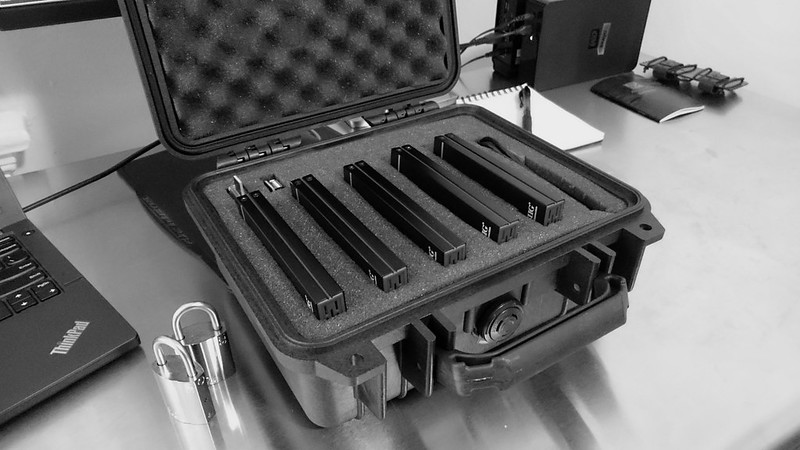
This past spring I mentioned my cold storage setup: a number of encrypted 2.5” drives in external enclosures, stored inside a Pelican 1200 case, secured with Abloy Protec2 321 locks. Offline, secure, and infrequently accessed storage is an important component of any strategy for resilient data. The ease with which this can be managed with git-annex only increases my infatuation with the software.
I’ve been happy with the Seagate ST2000LM003 drives for this application. Unfortunately the enclosures I first purchased did not work out so well. I had two die within a few weeks. They’ve been replaced with the SIG JU-SA0Q12-S1. These claim to be compatible with drives up to 8TB (someday I’ll be able to buy 8TB 2.5” drives) and support USB 3.1. They’re also a bit thinner than the previous enclosures, so I can easily fit five in my box. The Seagate drives offer about 1.7 terabytes of usable space, giving this setup a total capacity of 8.5 terabytes.
Setting up git-annex to support this type of cold storage is fairly straightforward, but does necessitate some familiarity with how the program works. Personally, I prefer to do all my setup manually. I’m happy to let the assistant watch my repositories and manage them after the setup, and I’ll occasionally fire up the web app to see what the assistant daemon is doing, but I like the control and understanding provided by a manual setup. The power and flexibility of git-annex is deceptive. Using it solely through the simplified interface of the web app greatly limits what can be accomplished with it.
Encryption
Before even getting into git-annex, the drive should be encrypted with LUKS/dm-crypt. The need for this could be avoided by using something like gcrypt, but LUKS/dm-crypt is an ingrained habit and part of my workflow for all external drives. Assuming the drive is /dev/sdc, pass cryptsetup some sane defaults:
At this point the drive is ready. I close it and then mount it with udiskie to make sure everything is working. How the drive is mounted doesn’t matter, but I like udiskie because it can integrate with my password manager to get the drive passphrase.
With the encryption handled, the drive should now be mounted at /media/themisto. For the first few steps, we’ll basically follow the git-annex walkthrough. Let’s assume that we are setting up this drive to be a repository of the annex ~/video. The first step is to go to the drive, clone the repository, and initialize the annex. When initializing the annex I prepend the name of the remote with satellite :. My cold storage drives are all named after satellites, and doing this allows me to easily identify them when looking at a list of remotes.
$ cd /media/themisto
$ git clone ~/video
$ cd video
$ git annex init "satellite : themisto"
Disk Reserve
Whenever dealing with a repository that is bigger (or may become bigger) than the drive it is being stored on, it is important to set a disk reserve. This tells git-annex to always keep some free space around. I generally like to set this to 1 GB, which is way larger than it needs to be.
$ git config annex.diskreserve "1 gb"
Adding Remotes
I’ll then tell this new repository where the original repository is located. In this case I’ll refer to the original using the name of my computer, nous.
$ git remote add nous ~/video
If other remotes already exist, now is a good time to add them. These could be special remotes or normal ones. For this example, let’s say that we have already completed this whole process for another cold storage drive called sinope, and that we have an s3 remote creatively named s3.
Trust is a critical component of how git-annex works. Any new annex will default to being semi-trusted, which means that when running operations within the annex on the main computer – say, dropping a file – git-annex will want to confirm that themisto has the files that it is supposed to have. In the case of themisto being a USB drive that is rarely connected, this is not very useful. I tell git-annex to trust my cold storage drives, which means that if git-annex has a record of a certain file being on the drive, it will be satisfied with that. This increases the risk for potential data-loss, but for this application I feel it is appropriate.
$ git annex trust .
Preferred Content
The final step that needs to be taken on the new repository is to tell it what files it should want. This is done using preferred content. The standard groups that git-annex ships with cover most of the bases. Of interest for this application is the archive group, which wants all content except that which has already found its way to another archive. This is the behaviour I want, but I will duplicate it into a custom group called satellite. This keeps my cold storage drives as standalone things that do not influence any other remotes where I may want to use the default archive.
For other repositories, I may want to store the data on multiple cold storage drives. In that case I would create a redundantsatellite group that wants all content which is not already present in two other members of the group.
The book begins with an overview of espionage immediately before, during, and shortly after the Cold War, before moving on to the role played by Western intelligence agencies in the current millenium. Grey contrasts the earlier focus on human intelligence with the growing dependency on signals intelligence and assassination programs, and makes a compelling case for the need to return to a balanced approach with a focus on traditional spy running.
The dichotomy is reminiscent between that of the longer-term, unconventional warfare practiced by US Special Forces and the direct action focus of other Special Operations Forces as discussed by Tony Schwalm.
As I’ve mentioned previously, I store just about everything that matters in git-annex (the only exception is code, which is stored directly in regular git). One of git-annex’s many killer features is special remotes. They make tenable this whole “cloud storage” thing that we do now.
A special remote allows me to store my files with a large number of service providers. It makes this easy to do by abstracting away the particulars of the provider, allowing me to interact with all of them in the same way. It makes this safe to do by providing encryption. These factors encourage redundancy, reducing my reliance on any one provider.
Recently I began playing with rclone. Rclone is a program that supports file syncing for a handful of cloud storage providers. That’s semi-interesting by itself but, more significantly, there is a git-annex special remote wrapper. That means any of the providers supported by rclone can be used as a special remote. I looked through all of rclone’s supported providers and decided there were a few that I had no reason not to use.
Hubic
Hubic is a storage provider from OVH with a data center in France. Their pricing is attractive. I’d happily pay €50 per year for 10TB of storage. Unfortunately they limit connections to 10 Mbit/s. In my experience they ended up being even slower than this. Slow enough that I don’t want to give them money, but there’s still no reason not to take advantage of their free 25 GB plan.
I want git-annex to automatically send everything to Hubic, so I took advantage of standard groups and put the repository in the backup group.
$ git annex wanted hubic standard
$ git annex group hubic backup
Given Hubic’s slow speed, I don’t really want to download files from it unless I need to. This can be configured in git-annex by setting the cost of the remote. Local repositories default to 100 and remote repositories default to 200. I gave the Hubic remote a high cost so that it will only be used if no other remotes are available.
$ git config remote.hubic.annex-cost 500
If you would like to try Hubic, I have a referral code which gives us both an extra 5GB for free.
Backblaze B2
B2 is the cloud storage offering from backup company Backblaze. I don’t know anything about them, but at $0.005 per GB I like their pricing. A quick search of reviews shows that the main complaint about the service is that they offer no geographic redundancy, which is entirely irrelevant to me since I build my own redundancy with my half-dozen or so remotes per repository.
Signing up with Backblaze took a bit longer. They wanted a phone number for 2-factor authentication, I wanted to give them a credit card so that I could use more than the 10GB they offer for free, and I had to generate an application key to use with rclone. After that, the rclone setup was simple.
While I did not measure the speed with B2, it feels as fast as my S3 or rsync.net remotes, so I didn’t bother setting the cost.
Google Drive
While I do not regularly use Google services for personal things, I do have a Google account for Android stuff. Google Drive offers 15 GB of storage for free and rclone supports it, so why not take advantage?